
Arduino device driver trouble? A simple fix!
Have you tried fixing an “Unknown device” error with your Arduino? If you’ve failed to resolve the issue, you likely saw a screen like this:

And maybe you even tried disabling driver signature enforcement as such:
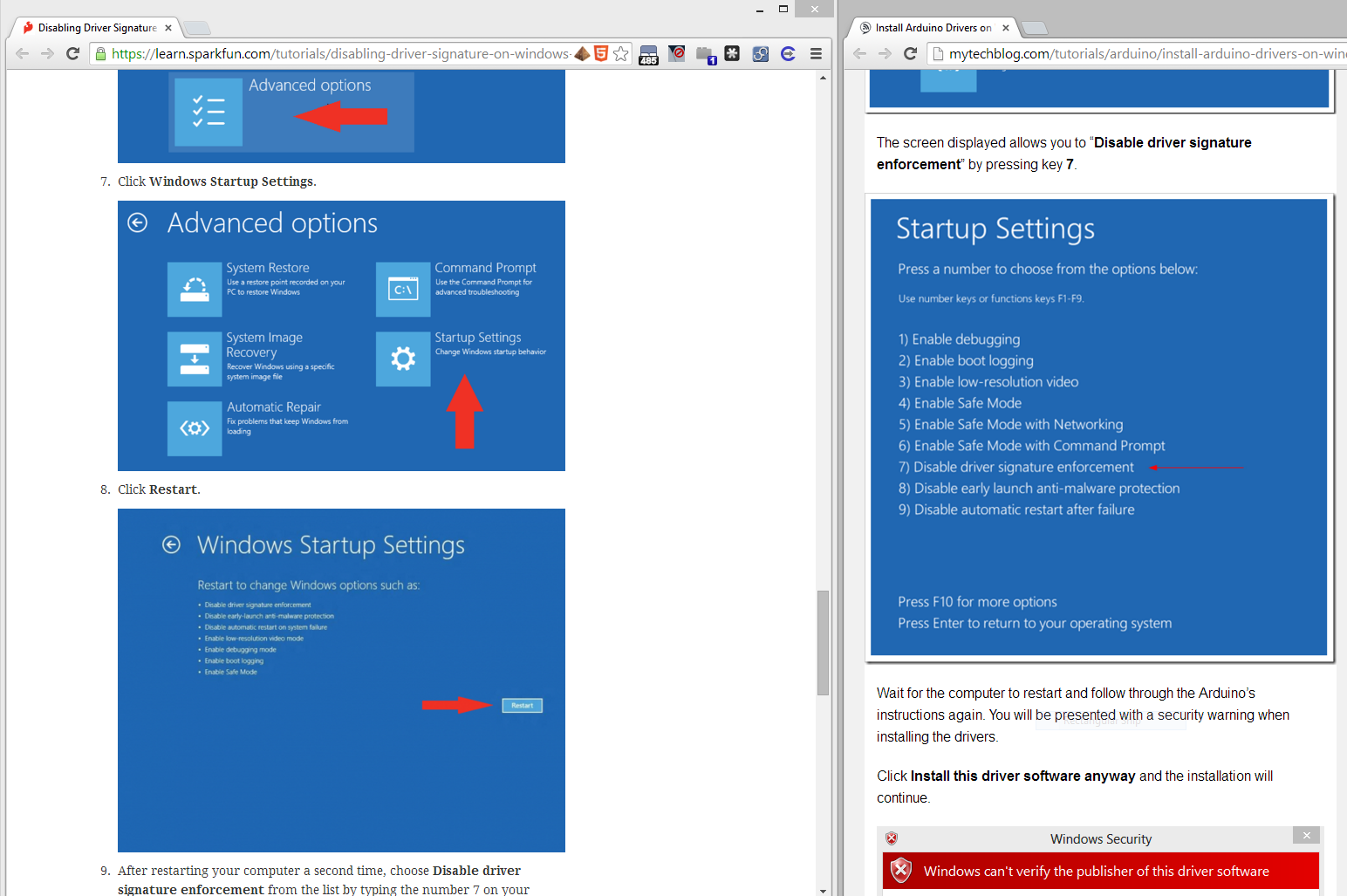
That is a very bad idea – and also unnecessary. Driver signature enforcement is a critical security feature, as a tremendous number of modern rootkits (and other malware) install drivers to do their dirty business.
If you look in the windows “C:\Windows\Inf\setupapi.dev.log” log file, you’ll see something like this:
>>> [Device Install (DiShowUpdateDevice) - USB\VID_2341&PID_0043\64131383231351F0E142]
>>> Section start 2014/04/13 17:32:12.346
 cmd: "C:\WINDOWS\system32\mmc.exe" C:\WINDOWS\system32\devmgmt.msc
 dvi: {DIF_UPDATEDRIVER_UI} 17:32:12.348
 dvi: Class installer: Enter 17:32:12.350
 dvi: Class installer: Exit
 dvi: Default installer: Enter 17:32:12.353
 dvi: Default installer: Exit
 dvi: {DIF_UPDATEDRIVER_UI - exit(0xe000020e)} 17:32:12.356
 ndv: {Update Driver Software Wizard for USB\VID_2341&PID_0043\64131383231351F0E142}
 sto: {Setup Import Driver Package: c:\program files (x86)\arduino\drivers\arduino.inf} 17:32:15.270
 inf: Provider: Arduino LLC (www.arduino.cc)
 inf: Class GUID: {4D36E978-E325-11CE-BFC1-08002BE10318}
 inf: Driver Version: 01/01/2013,1.0.0.0
 inf: Catalog File: arduino.cat
 sto: {Copy Driver Package: c:\program files (x86)\arduino\drivers\arduino.inf} 17:32:15.279
 sto: Driver Package = c:\program files (x86)\arduino\drivers\arduino.inf
 sto: Flags = 0x00000007
 sto: Destination = C:\Users\ALEXAN~1\AppData\Local\Temp\{00b32666-ea3b-6d4c-9bff-6460ec92da53}
 sto: Copying driver package files to 'C:\Users\ALEXAN~1\AppData\Local\Temp\{00b32666-ea3b-6d4c-9bff-6460ec92da53}'.
 flq: Copying 'c:\program files (x86)\arduino\drivers\arduino.cat' to 'C:\Users\ALEXAN~1\AppData\Local\Temp\{00b32666-ea3b-6d4c-9bff-6460ec92da53}\arduino.cat'.
 flq: Copying 'c:\program files (x86)\arduino\drivers\arduino.inf' to 'C:\Users\ALEXAN~1\AppData\Local\Temp\{00b32666-ea3b-6d4c-9bff-6460ec92da53}\arduino.inf'.
 sto: {Copy Driver Package: exit(0x00000000)} 17:32:15.333
 pol: {Driver package policy check} 17:32:15.358
 pol: {Driver package policy check - exit(0x00000000)} 17:32:15.358
 sto: {Stage Driver Package: C:\Users\ALEXAN~1\AppData\Local\Temp\{00b32666-ea3b-6d4c-9bff-6460ec92da53}\arduino.inf} 17:32:15.359
 inf: {Query Configurability: C:\Users\ALEXAN~1\AppData\Local\Temp\{00b32666-ea3b-6d4c-9bff-6460ec92da53}\arduino.inf} 17:32:15.378
 inf: Driver package 'arduino.inf' is configurable.
 inf: {Query Configurability: exit(0x00000000)} 17:32:15.396
 flq: Copying 'C:\Users\ALEXAN~1\AppData\Local\Temp\{00b32666-ea3b-6d4c-9bff-6460ec92da53}\arduino.cat' to 'C:\WINDOWS\System32\DriverStore\Temp\{4a836504-b706-3e4d-ad38-07234e40f429}\arduino.cat'.
 flq: Copying 'C:\Users\ALEXAN~1\AppData\Local\Temp\{00b32666-ea3b-6d4c-9bff-6460ec92da53}\arduino.inf' to 'C:\WINDOWS\System32\DriverStore\Temp\{4a836504-b706-3e4d-ad38-07234e40f429}\arduino.inf'.
 sto: {DRIVERSTORE IMPORT VALIDATE} 17:32:15.407
 sig: {_VERIFY_FILE_SIGNATURE} 17:32:15.480
 sig: Key = arduino.inf
 sig: FilePath = C:\WINDOWS\System32\DriverStore\Temp\{4a836504-b706-3e4d-ad38-07234e40f429}\arduino.inf
 sig: Catalog = C:\WINDOWS\System32\DriverStore\Temp\{4a836504-b706-3e4d-ad38-07234e40f429}\arduino.cat
! sig: Verifying file against specific (valid) catalog failed! (0x800b0109)
! sig: Error 0x800b0109: A certificate chain processed, but terminated in a root certificate which is not trusted by the trust provider.
 sig: {_VERIFY_FILE_SIGNATURE exit(0x800b0109)} 17:32:15.497
 sig: {_VERIFY_FILE_SIGNATURE} 17:32:15.497
 sig: Key = arduino.inf
 sig: FilePath = C:\WINDOWS\System32\DriverStore\Temp\{4a836504-b706-3e4d-ad38-07234e40f429}\arduino.inf
 sig: Catalog = C:\WINDOWS\System32\DriverStore\Temp\{4a836504-b706-3e4d-ad38-07234e40f429}\arduino.cat
! sig: Verifying file against specific Authenticode(tm) catalog failed! (0x800b0101)
! sig: Error 0x800b0101: A required certificate is not within its validity period when verifying against the current system clock or the timestamp in the signed file.
 sig: {_VERIFY_FILE_SIGNATURE exit(0x800b0101)} 17:32:15.501
!!! sig: An unexpected error occurred while validating driver package. Catalog = arduino.cat, Error = 0x800B0101
!!! sig: Driver package is considered unsigned, and Code Integrity is enforced.
!!! sig: Driver package failed signature validation. Error = 0xE0000247
 sto: {DRIVERSTORE IMPORT VALIDATE: exit(0xe0000247)} 17:32:15.503
!!! sig: Driver package failed signature verification. Error = 0xE0000247
!!! sto: Failed to import driver package into Driver Store. Error = 0xE0000247
 sto: {Stage Driver Package: exit(0xe0000247)} 17:32:15.505
 sto: {Setup Import Driver Package - exit (0xe0000247)} 17:32:15.509
!!! ndv: Driver package import failed for device.
!!! ndv: Error 0xe0000247: A problem was encountered while attempting to add the driver to the store.
 ndv: Installing NULL driver.
 dvi: {Plug and Play Service: Device Install for USB\VID_2341&PID_0043\64131383231351F0E142}
! ndv: Installing NULL driver!
 dvi: {DIF_ALLOW_INSTALL} 17:32:15.582
 dvi: No class installer for 'Unknown driver software package'
 dvi: No CoInstallers found
 dvi: Default installer: Enter 17:32:15.583
 dvi: Default installer: Exit
 dvi: {DIF_ALLOW_INSTALL - exit(0xe000020e)} 17:32:15.584
 dvi: {DIF_REGISTER_COINSTALLERS} 17:32:15.584
 dvi: No class installer for 'Unknown driver software package'
 dvi: Default installer: Enter 17:32:15.585
 dvi: Default installer: Exit
 dvi: {DIF_REGISTER_COINSTALLERS - exit(0x00000000)} 17:32:15.586
 dvi: {DIF_INSTALLDEVICE} 17:32:15.586
 dvi: No class installer for 'Unknown driver software package'
 dvi: No CoInstallers found
 dvi: Default installer: Enter 17:32:15.588
! dvi: Installing NULL driver!
 dvi: Install Null Driver: Removing device sub-tree. 17:32:15.590
 dvi: Install Null Driver: Removing device sub-tree completed. 17:32:15.594
 dvi: Install Null Driver: Restarting device. 17:32:15.598
 dvi: Install Null Driver: Restarting device completed. 17:32:15.602
 dvi: Install Device: Starting device. 17:32:15.603
 dvi: Install Device: Starting device completed. 17:32:15.734
 dvi: Default installer: Exit
 dvi: {DIF_INSTALLDEVICE - exit(0x00000000)} 17:32:15.735
 ump: {Plug and Play Service: Device Install exit(00000000)}
The lines with exclamation points indicate issues – here I’ll highlight a few of them:
! sig: Verifying file against specific (valid) catalog failed! (0x800b0109)
! sig: Error 0x800b0109: A certificate chain processed, but terminated in a root certificate which is not trusted by the trust provider.
! sig: Verifying file against specific Authenticode(tm) catalog failed! (0x800b0101)
! sig: Error 0x800b0101: A required certificate is not within its validity period when verifying against the current system clock or the timestamp in the signed file.
!!! sig: An unexpected error occurred while validating driver package. Catalog = arduino.cat, Error = 0x800B0101
!!! sig: Driver package is considered unsigned, and Code Integrity is enforced.
!!! sig: Driver package failed signature validation. Error = 0xE0000247
!!! sig: Driver package failed signature verification. Error = 0xE0000247
!!! sto: Failed to import driver package into Driver Store. Error = 0xE0000247
!!! ndv: Driver package import failed for device.
!!! ndv: Error 0xe0000247: A problem was encountered while attempting to add the driver to the store.
Isn’t it great that Microsoft displays the least useful information in the GUI? The critical piece of information is: “A required certificate is not within its validity period when verifying against the current system clock or the timestamp in the signed file”, as seen in the “C:\Program Files (x86)\Arduino\drivers\arduino.cat” file:
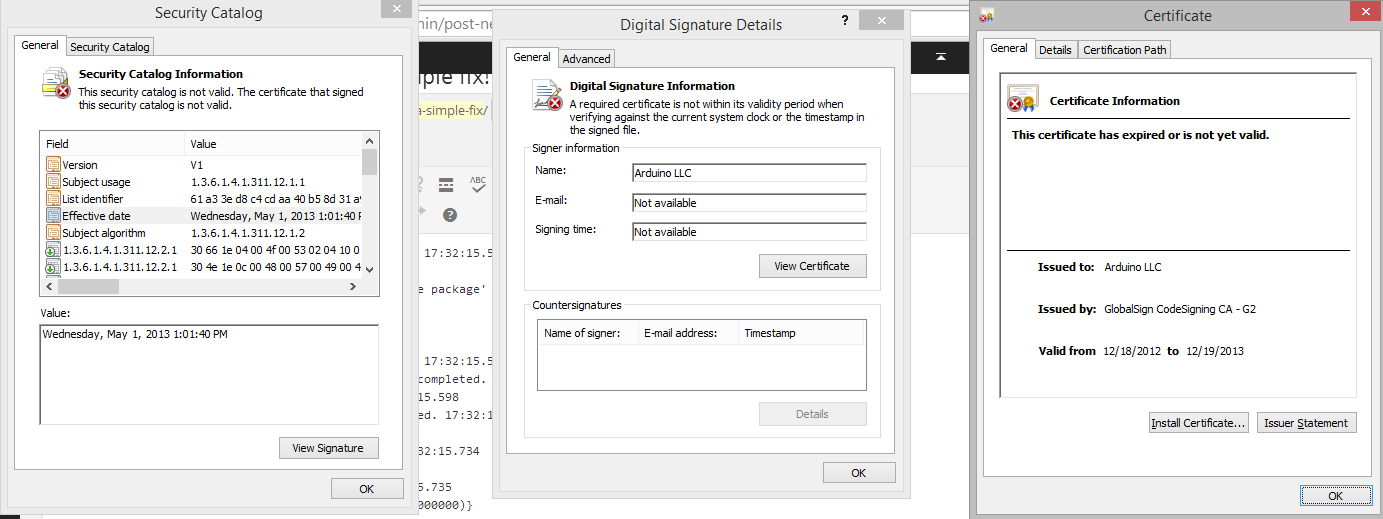
Ahh! They just forgot to resign their drivers!
Like most people probably (should) do, I went to upgrade to the latest version of the Arduino IDE. Once I got to the download page, I was perplexed to see:
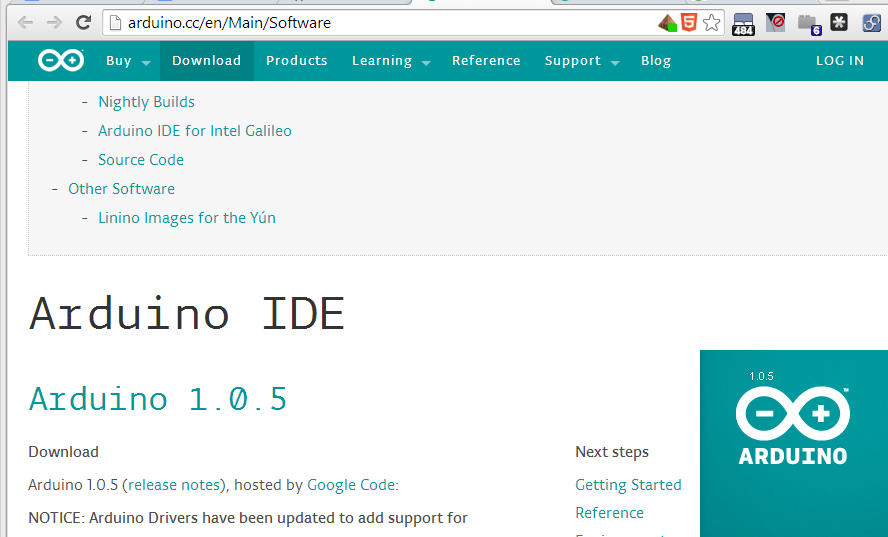 Off to google I went! Searching to figure out what was up with my computer. But the Arduino developers have made some BAD UI choices.

Read it carefully.
The most recent version of the Windows Arduino IDE is in fact 1.0.5-r2! Yeah, they couldn’t just release a version 1.0.6 to keep up with signed drivers. Feel free to go ahead and install 1.0.5-r2.

And you’re good to go 🙂


 Alexander Riccio
or you can just use https://codebender.cc and not have to worry about such things 🙂
LikeLike
Oooh! Neat!
LikeLike
hello i have the same problem.
! sig: Verifying file against specific (valid) catalog failed! (0x800b0109)
! sig: Error 0x800b0109: A certificate chain processed, but terminated in a root certificate which is not trusted by the trust provider.
sig: {_VERIFY_FILE_SIGNATURE exit(0x800b0109)} 19:32:13.451
sig: {_VERIFY_FILE_SIGNATURE} 19:32:13.452
but i have installed the 1.0.6 version. still no luck.
LikeLike
Where is the “sig: ” stuff coming from? It almost looks like COM error codes to me!
LikeLike
sig: Key = arduino uno rev3.inf
sig: FilePath = C:\Windows\System32\DriverStore\FileRepository\arduino uno rev3.inf_x86_neutral_65ebaae8c82d2ccd\arduino uno rev3.inf
sig: Catalog = C:\Windows\System32\DriverStore\FileRepository\arduino uno rev3.inf_x86_neutral_65ebaae8c82d2ccd\CDC_vista.cat
! sig: Verifying file against specific (valid) catalog failed! (0x00000057)
! sig: Error 87: The parameter is incorrect.
———
get unknown cdc_vista.cat?? driver no work
LikeLike